




I did consider this for a long time. But people who've done this often say it's a lot of work to manage contributions. So I'm not so sure anymore it's worth the trade-off.
There's also a decent risk of people straight out copying our hard work for their own personal gain. Even if the license would not allow it. This is already happening to some extent (people straight up copy our design, copy, etc to make a competing product).
I really like that! I've been toying with the idea of adding support for regular hashtags. I think it could open up a bunch of possibilities. For example grouping all #marketing tasks together. Or indeed #bugfix'es etc.
The reason I haven't implemented it just yet, is because it might get confusing having both regular hashtags and product hashtags.
I agree that hashtags would be better, maybe you can just reserve some keywords that can't be used as project hashtags?
Some people use the "Product Updates" feature for this, which lets you write rich text posts about your product. It requires you to do more writing, but the upside is that you can nicely summarise a bunch of different changes in one cohesive story.
That feature needs a lot of work though. It's not very discoverable to begin with, and when you publish a post it doesn't get much attention on the site.
What do you think of this solution? Being able to write a short post, optionally linking to certain todos.
Yes, it can be the solution, and I like the idea to have more work to do when you want to highlight something 👍
I think that:
1. it should be displayed on the timeline (don't know if it's the case today)
2. it should probably "count" as a done task for the author
It currently isn't displayed on the timeline. It totally should though!
Right now it doesn't count as a done todo either. I guess we could make it count for the streak, as writing a status update is indeed work. And having to create a todo "Wrote a product update" just after you wrote it on WIP seems like unnecessary work.
So the nice thing about grouped-by-user is that you get the full context of what someone is working on today. One todo by itself might not always be meaningful, but by seeing the other things that person worked on today you get a good sense of what they are doing.
On the other hand, the downside is that every time someone posts a new todo it bumps up their whole list of that day. So as a viewer you start seeing the same content and you're not sure if there's anything you haven't seen it yet further down the page.
Perhaps there's an alternative solution possible. For example only showing the new todos (grouped per user), with the todos you've already seen hidden by a "See 4 more todos…" button. Although that would require us to start tracking which todos you've already seen. Or least a timestamp of when you last viewed the homepage. (anything created after that would be considered unseen).
I was just discussing this with @levelsio the other day.
Would you like it as an option or the default? I'm considering making it the default. So you see each todo individually ordered by date. Similar to how Twitter works.
I start to know individuals and their habits, to I pretty like the current view, but if you can keep the two views, yes, it can make sense to switch to the ungrouped view by default 👍
Or to keep WIP simple, maybe you can use the per-event view by default, and the grouped-by-user one only for people you follow?wip
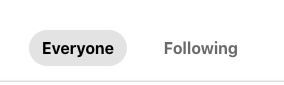
So the nice thing about grouped-by-user is that you get the full context of what someone is working on today. One todo by itself might not always be meaningful, but by seeing the other things that person worked on today you get a good sense of what they are doing.
On the other hand, the downside is that every time someone posts a new todo it bumps up their whole list of that day. So as a viewer you start seeing the same content and you're not sure if there's anything you haven't seen it yet further down the page.
Perhaps there's an alternative solution possible. For example only showing the new todos (grouped per user), with the todos you've already seen hidden by a "See 4 more todos…" button. Although that would require us to start tracking which todos you've already seen. Or least a timestamp of when you last viewed the homepage. (anything created after that would be considered unseen).
Cool idea. We can definitely do that. What would you like to see included? Same as the yearly review? I wonder if that gets repetitive after a while.
PH Makers sends you recap with (pending) todos and streaks.
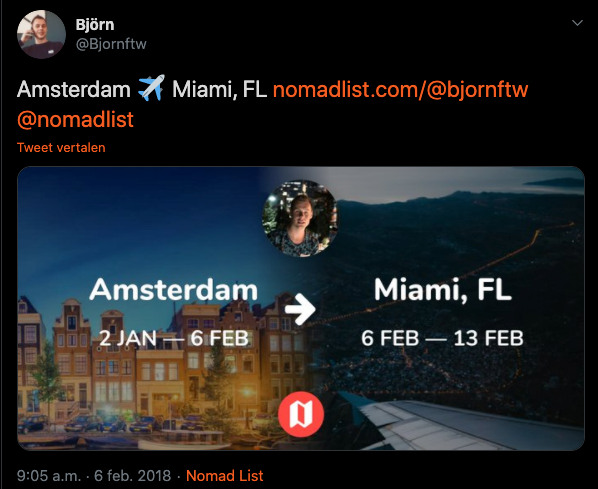
Maybe you can create images that we can share on Twitter like #nomadlist.
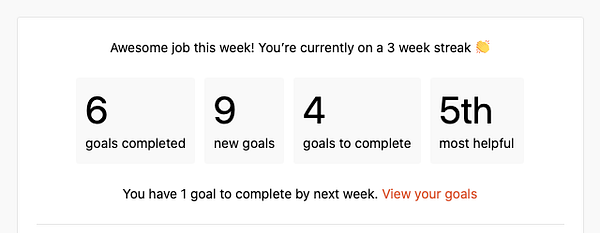
Ah cool. We do have a personal daily digest email you can enable in settings. We also have a weekly digest, but that's for the whole community.
We can add a personal weekly/quarterly digest and/or add it to the existing community digest.
I like the image idea. We can definitely do something like that as well.
For adding todos I use the Telegram bot, menubar app, and occasionally the website. (you can press N anywhere on the website to add a new todo).
- I'm not sure what your unique selling point is. Most website builders these days are responsive and don't require code.
- There are too many blue blocks trying to grab my attention. I'd focus on just one ("Get started")
- "Get started" seems boring. How about "Create my website" ?
- "What type of website do I have in mind?" 👉 I'd like to see examples instead of just an icon and a label. Also will I be able to go back and change this later on? If so, say that so users will be more comfortable making a choice. Maybe even recommend one for people who aren't sure yet.
- Actually, why not skip the step of having to create "Get started" and immediately show these options on the homepage? The fewer steps the better.
- It also feels kinda weird right now having these options in this narrow sidebar. Is the whole user experience going to be so weird?
- I chose "Personal" and now see a bunch of themes. That's cool, but many look very similar to each other.
- The animations/transitions when browsing the themes feel sluggish
- I now see the editor. I tried clicking the name to change it to mine, but it doesn't let me edit the text? I only see a sidebar show up to style it.
- It seems like I can drag some of the elements on the page, but in most cases they just jump back to where they came from. After trying some more, I discovered there are certain places where they can go. But not anyway. If I drop the element on an unsupported place it just jumps back without explanation.
If I were a real user you'd lost me at this point. I found no way to customize the text and make it my own site.
I think the earlier you can make it feel like it's the user's personal creation, the more likely they are they feel invested and don't want to lose it. So the more likely they create an account.
I didn't spend too much time on the editor, as you asked us to roast the landing page. For feedback on the editor I think it's best to have people record their screen and explain their thought process.
- Overall it does look quite simple
- I really like the fact I can try out the product without needing to create an account
- The site has its own identity. It looks different from all the other sites out there
- The landing page does a decent job showing off the different features
Thanks a lot for the in-depth feedback! :)
I actually built the platform on Chrome and hadn't looked at Safari - a lot of the problems you encountered such as lag and text not being editable are due to browser issues unfortunately. I'll definitely look into these!
As for everything else, I agree, will work upon improving them 👍
Appreciate you taking a look
I never noticed this to be honest. But you're right. If there's a long URL in a tweet, it only shows the first X number of characters.
I haven't really found long URLs to be an issue on WIP, but I will keep that idea in mind. Wouldn't be too hard to implement.
This is the kind of URL I would like to be shortcuted -> github.com/moul/github-yester…
Fair enough!
Another example (not from me) -> wip.chat/@gijsheerkens/todos/…
I see what you mean! Would indeed be nicer if we could truncate those.
@moul ✅ wip.chat/todos/153970