

hey, so this is roast, I didn't invent the rules. Overall it's not a bad landing, clear what it does and what's the value.
Part on the screenshot looks like a straw man comparison. On the right it says manual preview but it's clearly a different neural network-made preview. Also on the "good" example head almost touches the edge which is maybe eye-catching but not in a way that wants me to use it.
Next slide says that if you make preview manually you save hours of work per each, and shows infinity symbol. I don't believe it's true, especially the infinity part.
Everything is put on a card. What doesn't help is the body is wrapper into another container, so it looks like two levels of hierarchy without a reason. Sometimes you add third level with a different background. That's probably things you actually wanted to make cards.
All headings have the same level.
Only one of the verified reviews goes to trustpilot. What verifies the others?
I don't believe trial plan with smaller models will make a good impression of the product but maybe I'm wrong.
Cheers and good luck with your app, makes total sense to not make previews manually.
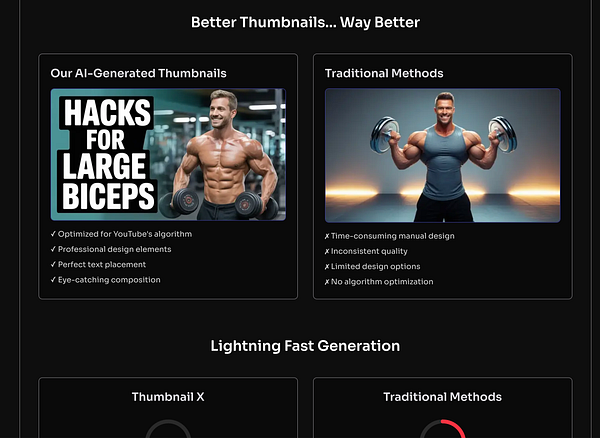
design-wise, it looks like you put everything on cards, sometimes there are 3 levels of them. You probably don't need most/all but one of them. The one I'd keep is the bottom one (pic 3)
Another thing is some layers are wider than others without an obvious reason, and most hover animations don't make sense to me either. Icons don't particularly mean anything to me.
Text centering doesn't make sense in most places. Spacing is arbitrary.


Thanks for checking Sergei. Now I can't unsee the things you mentioned (which is a good thing!). In the next couple of days I'll focus on the design aspect.
Homepage went through multiple revisions when new features were added.
Considering all these, I think better to use a proper template like Tailwind UI or get help from a designer.
Other than these, is it clear what the product is about? I think we need pictures or videos too based on comments from others.
Thanks again for taking the time to go through it and giving me suggestions :)
like the "serious business" aura, but surely needs lots of polishing
you know much about app dev?