




Marc Köhlbrugge
PRO
@marc
A good domain name never hurts. Tend to hold their value as well, so you can sell it later if you need the money.
Edit: Oh, and switch to annual WIP plan ($150/year) 😅
Well played, Marc, well played :P I'll probably do it tho, hadn't thought of it, great way to spend these $$$
Domains I've never bought to invest, I'm afraid a) good ones are either all taken or too expensive (>1.8k) b) I'll never be able to sell them and get a return on the investment. Any tips for a total noob in this?
I missed the follow-up question when it was originally asked, but answering for future reference:
You can absolutely buy valuable domains for below $1,800. I've bought domains for hundreds of dollars and sold them for thousands. It comes down to patience, observing trends ( namebio.com is helpful to determine sale prices of different categories of domains), and a bit of luck.
If I had $1,800 to spend on domains I'd focus on .co's as they are still relatively affordable, but also popular with startups. You can also spend some money on backordering domains, but that requires a lot of patience and you wouldn't spend the money until the backorder actually goes through.
People typically use the same email for both, but bigger corporations might have a separate billing email address.
I’d personally go with using the same email everywhere since that’s the most common approach and that’s how it’s expected to work by most users. The reason they might enter a different email address could be because they have different email addresses and mix them up. This can be quite confusing when they try to find an email receipt, or when you try to find a charge with the wrong email address.
So keep things simple, use the same email address everywhere, and if people start asking for a separate billing address investigate why and whether it’s really something you need to support. And if you do whether it would be be part of an enterprise plan.
Well, it would help you find other makers to ask help from. (Alternative would be for makers to tag themselves with their skills.)
oh thats true - havent thought about it that way :)
Here's a quick mock up of what it could look like for WIP Q&A.
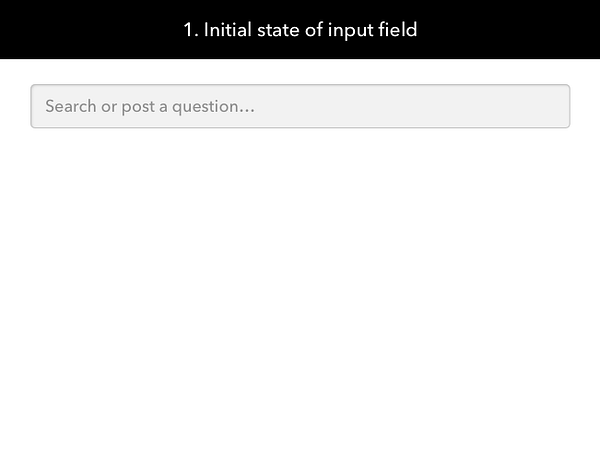
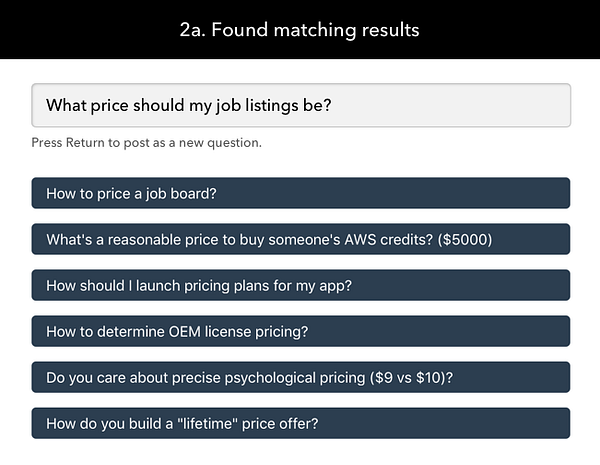
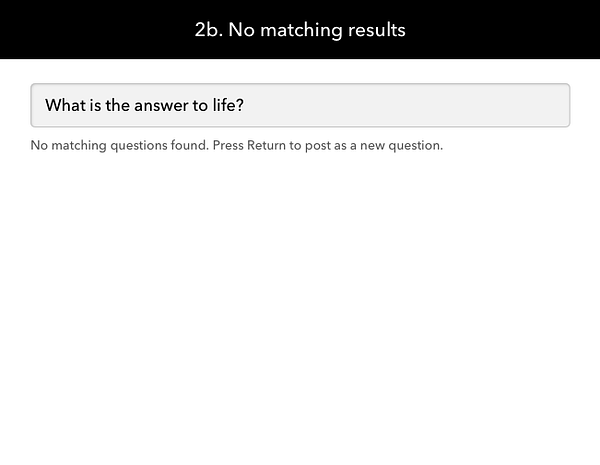
You could implement something like StackOverflow with Algolia Search or you can implement your short & simple fuzzy-matching algorithm like match-sorter
I don't use AdBlocker Plus, but based on what you describe it seems that it aggressively blocks any Javascript with the word "Twitter" in it. It probably confuses that for Twitter tracking Javascripts used for Tweet and Follow buttons.
Personally I don't pay too much attention to people using faulty browser extensions as I consider it their own damn fault, but if it's a significant share of your users or it leads to many support inquiries then yeah you want to find a solution. I don't see the problem with just renaming the files. It sounds like you're overthinking it.
You probably have many more todo's to complete. Just rename the files and be done with it :)
If you replace "twitter" with "twttr" (the original name) the file name remains descriptive and it probably won't get blocked.
The right price depends on your goals. With a two-sided marketplace like a job board you probably want to kickstart the supply side (e.g. job posts) in which case it makes sense to charge nothing at all. Like @levelsio did you can start with a nominal amount to help keep out the spammers, but I personally would just charge nothing and manually approve new listings until that becomes untenable.
If you already have an audience then you don't need to solve the marketplace problem and you could start charging right away. However, even in this case you might want to start at $0 or very low just to test the waters and get some metrics on how well the job listings are performing. As that's information you'll need when you start charging real money.
Okay, so let's say you're ready to start charging real money. How much do you charge? Well this really depends on how much the customer is willing to pay. Which in turn depends on the value you provide (reach and relevance play key roles here), the competitive landscape, and a whole lot of other factors. One approach is to look at the competition, significantly undercut them (again, see @levelsio's advice), and then slowly keep increasing the price until you feel like you've hit the sweet spot. It's generally easier to increase the price over time then to decrease it (as that will make for unhappy previous customers) so that's why starting on the low side might be better. However, this also depends on market size because if your business will be primarily repeat customers then those might be less willing to pay a suddenly higher price. So again, it depends on the circumstances.
Either way, once you feel like you've found the right price: keep iterating over time. The market will change, the value of your job listings will too, so you should frequently reassess your pricing. (note to self)
Are you using local file storage for anything such as storing session data? Heroku's file system is ephemeral which means you can't rely on any data that's not part of your original codebase to stick around between deploys.
My guess is that's the root of your problem as I can't think of anything else that would cause this issue. I use Heroku for all of my sites (including WIP) and never had this problem of users being signed out.
If you're generating tracking URLs for your own site and you use Google Analytics, then I would recommend UTM parameters. They give you the most flexibility and are properly supported in Google Analytics.
If you're linking to other sites and you want to let them know you sent them, then using a ref parameter might be more appropriate. The reason for this is that not every site uses Google Analytics (and so UTM parameters might not be supported), and more importantly: Google Analytics won't like if you don't supply all required UTM parameters. (e.g. only utm_source)
In the past I used ?utm_source=betalist when linking to startups on #betalist, but we frequently received questions about this as it was generating error messages in people's Google Analytics dashboards. Switching to
?ref=betalist seems to have solved this.
The ref parameter will still show up in Google Analytics, but at a difference place. I haven't done much research into which one is most visible (in case that's your goal).
For what it's worth, I don't think ref is a standardized approach but it seems to becoming the convention. (some sites that use it include BetaList, Product Hunt, WIP, Places to Work, etc.
A service like www.import.io lets you scrape publicly available data that have no API.
Whether you can show that on your dashboard depends on which service you're using. I'm not familiar with them nor have I used Import.io recently, but I imagine they allow for a JSON output which you can then import in your dashboard tool.
If you're a developer you can also create your own scraper. A tool like SelectorGadget lets you easily generate a CSS selector that points to the data you need. You just need to write a script that extract the data based on that CSS selector.