



Graeme
@graeme_fulton
did it work?
@graeme_fulton
Yes, it did 😉 Successfully posted two times.
wip.chat/@HiYukoIm/todos/79740
wip.chat/@HiYukoIm/todos/79749
After dozens of trial and error, I discovered some tips of uploading gif.
Use Telegram desktop clients
Always from desktop clients.
Upload from wip.chat website doesn't work however you compress your animated gif.
I sent an animated gif from Telegram web client and worked one time, but not always the case.Make the gif dimension as small as possible
Set the maximum length around 800px if the duration of your gif is short
But if your gif is longer than 10 seconds, keep the size within 600x400. Or 400x200 if the former doesn't work.
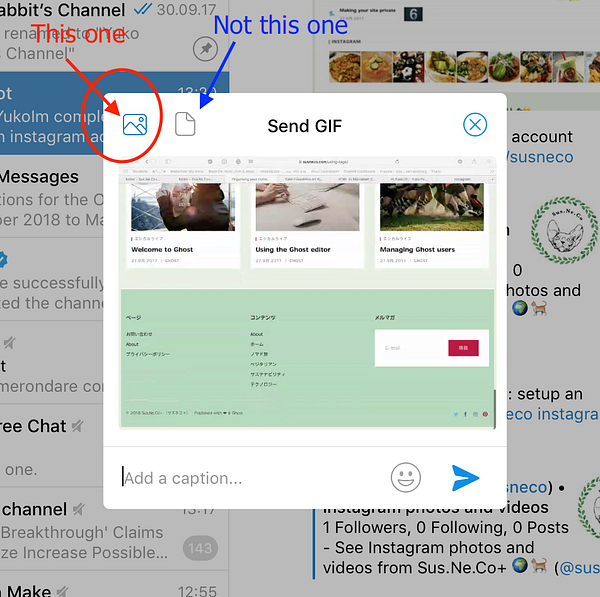
As @lenilsonjr mentioned Kap is very useful.Don't send it as a file, but as a picture.
I attached the screenshot. I don't know about the others, but the file attachment didn't work in my case.
Hope it helps! 👍
yeah you have to forward message from wipbot to ifttt bot within telegram - must be a way to do that automatically 🤔 idk
/rip my hopes n dreams
I just tied it, it works well:
- set up new applet
- Select telegram, Choose trigger: 'New message with key phrase to @IFTTT'
- Add your product hashtag as the keyphrase (or your telegram username), send anything as the reply
- Create trigger -> Twitter -> Post a tweet
- In front of {{text}}, add ✅ or something
doesn't @ifttt have to be in the wipchat channel though?
yeah you have to forward message from wipbot to ifttt bot within telegram - must be a way to do that automatically 🤔 idk
/rip my hopes n dreams
since I started using this again, I don't think I built a streak more than 2 or 3 days. Always had a day where I didn't log something somewhere in the middle, even if I had done stuff. But I just carry on and the streak was like a bonus nice thing when one happens