Back
Telesink
Telesink
#telesink
Open-source, multi-column event dashboard for tracking everything happening in your product in real time.
Load previous page…
I just published the first version of telesink-javascript - a lightweight Browser+Node SDK for  #telesink
Already using it in a few of my projects. It’s simple to integrate and designed to stay minimal.
Code’s on GitHub 👇
github.com/telesink/telesink-…
#telesink
Already using it in a few of my projects. It’s simple to integrate and designed to stay minimal.
Code’s on GitHub 👇
github.com/telesink/telesink-…
🎉 I just published the first version of telesink-ruby, the Ruby SDK for #telesink.
I’ll be dogfooding it across all my projects to validate behavior in real-world use. Once it’s solid, I’ll roll out the rest of the SDKs.
The code's on GitHub 👇
github.com/telesink/telesink-…
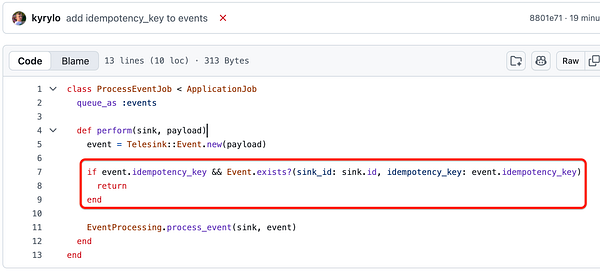
🛡️ Pro tip for building reliable Events APIs:
Network delays, retries & hiccups make duplicate events inevitable. (Double charges, repeated notifications, messed-up state - all bad.)
Fix it with idempotency_key:
✅ Clients send a unique key (UUID works great) with every event
✅ Your API stores processed keys in the DB (unique constraint).
✅ Seen before? Ignore & return success.
✅ New? Process & record it.
I just added full support for it in #telesink.
Cloudflare’s email obfuscation caught me off guard when I deployed
#telesink to production.
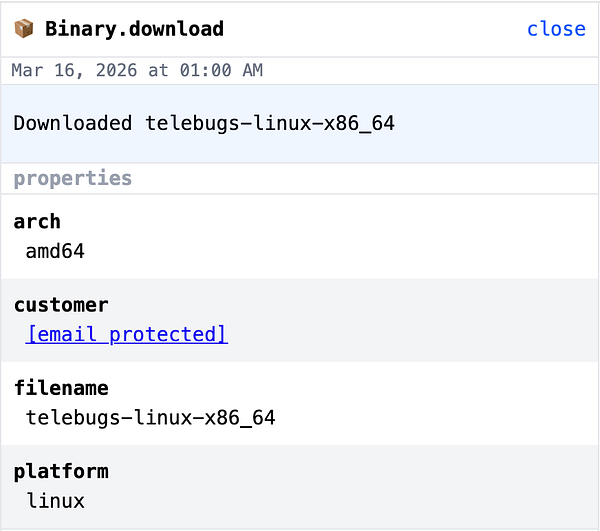
I track  #telebugs downloads and display the real customer email in my private dashboard to see who downloaded and when. But every event came back as [email protected].
It’s fully internal: users own the data, no scrapers involved.
Turns out it’s on by default.
To disable:
✅ Choose your domain
✅ Rules → Configuration Rules → Create rule
✅ Hostname equals <yourdomain.com>
✅ Email Obfuscation → Off
If you’re running internal tools on Cloudflare, check this before going live. Saved me the debugging headache.
#telebugs downloads and display the real customer email in my private dashboard to see who downloaded and when. But every event came back as [email protected].
It’s fully internal: users own the data, no scrapers involved.
Turns out it’s on by default.
To disable:
✅ Choose your domain
✅ Rules → Configuration Rules → Create rule
✅ Hostname equals <yourdomain.com>
✅ Email Obfuscation → Off
If you’re running internal tools on Cloudflare, check this before going live. Saved me the debugging headache.
What’s the simplest schema for an Events API?
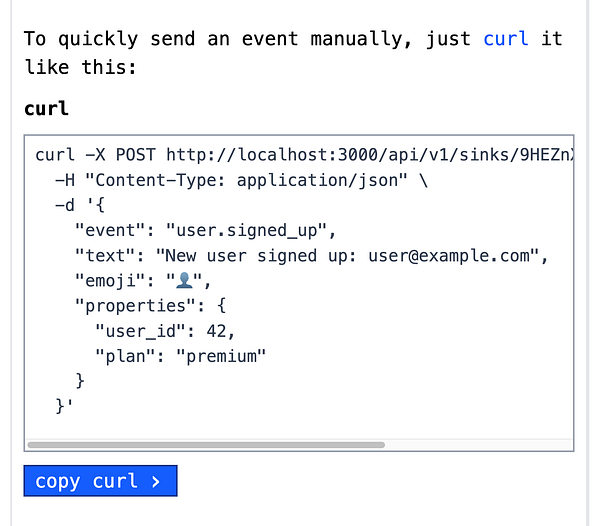
That’s the exact question I’ve been grinding on for #telesink.
I wanted the most minimal thing that’s still actually useful. One path: just accept text and parse everything (Telegram style). Super simple... but Telegram is a generic chat client. We’re building a specific tool.
So I landed on this: text + emoji + event (the name) + properties (any key-values you want).
Flexible enough because of properties, yet stupidly clear and understandable.
Thoughts?
I decided to avoid modals and toasts entirely in #telesink.
Everything is rendered inline with Turbo Frames. The goal is ultimate simplicity and speed.
In the video below: signing up and sending the first event.
Quick glimpse of #telesink that I'm actively building.
✅ Every event your app sends lands in a sink
✅ Dashboard columns: slice, organize & group events (in the future)
✅ Click any event for full details
Events in #telesink will be grouped into sinks and displayed as columns.
You’ll be able to add as many columns as you like. Each column will filter a sink based on your own criteria.
P.S. This is the goal. I'm still very early in development.
CSS clamp() is straight-up MAGIC.
I’m having an absolute BLAST building this buttery-smooth fluid layout for #telesink.
Going full unconventional with the experience, but honestly, clamp() was made for dense, information-rich UIs like this. Feels like cheating (in the best way).
For #telesink, I went with a fluid, text-first design.
Entire UI built on text. The design is its absence.
Your feeds elegantly fill the whitespace, making every view uniquely yours.
I’m going all-in on #telesink again (the open-source real-time event tracking dashboard of my dreams).
Kicked it off about a month ago, but poor planning + some bad luck meant I barely touched it since.
Starting today, I’m in full Telesink mode (while staying on standby for Telebugs support tickets).