
Back
Telesink
Telesink
#telesink
Open-source, multi-column event dashboard for tracking everything happening in your product in real time.
🚀 ActiveJob integration for  #telesink is ready
Add the `telesink-activejob` gem, set 1 env variable, and start tracking job execution events instantly.
Filter everything in the dashboard.
P.S. Looking for beta testers:
x.com/kyrylo/status/204361571…
#telesink is ready
Add the `telesink-activejob` gem, set 1 env variable, and start tracking job execution events instantly.
Filter everything in the dashboard.
P.S. Looking for beta testers:
x.com/kyrylo/status/204361571…
Don’t let the longest item decide the height of every card.
I just removed fixed heights from #telesink event cards.
Short events like this weather sink used to sit in tall, mostly empty boxes. Now the cards shrink to fit their actual content, and we can fit way more events on one screen.
Tiny change. Surprisingly big density win.
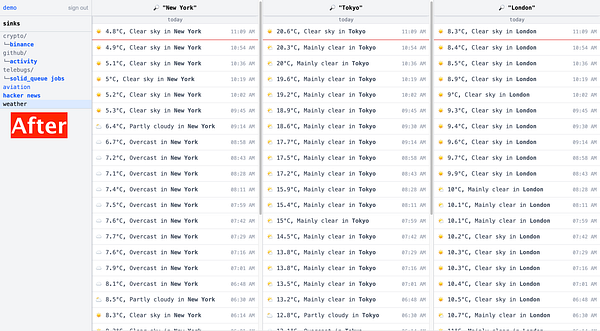
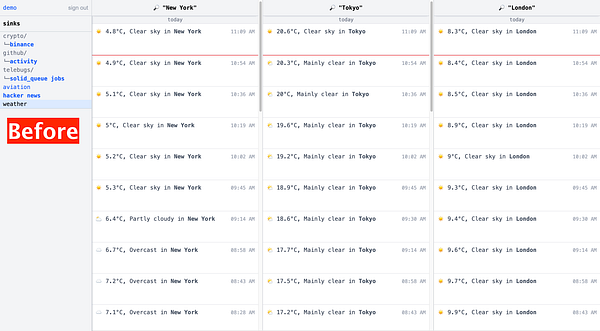
Don’t let the longest item decide the height of every card.
I just removed fixed heights from #telesink event cards.
Short events like this weather sink used to sit in tall, mostly empty boxes. Now the cards shrink to fit their actual content, and we can fit way more events on one screen.
Tiny change. Surprisingly big density win.
Most analytics dashboards are just one big overloaded mess.
#telesink is different: everything flows into one single sink, and you decide what to filter.
But once you track too many event types, even custom filters get overwhelming.
So I added Folders ✨
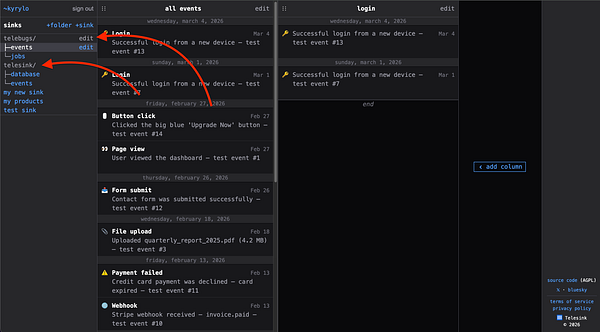
Here's how a simple monitoring for Solid Queue jobs could look with #telesink 👇
It's currently hardcoded to only  #telebugs demo jobs, but I'm planning to extract that code into a gem soon so you could get this functionality by simply depending on the gem.
Of course, you could come up with your own events to track, and your own dashboard filters.
Would this be useful for your projects? Let me know what you think 👀
#telebugs demo jobs, but I'm planning to extract that code into a gem soon so you could get this functionality by simply depending on the gem.
Of course, you could come up with your own events to track, and your own dashboard filters.
Would this be useful for your projects? Let me know what you think 👀
Solid Queue is my default for background jobs in Rails.
Still feels a bit blind without real-time visibility though. I just started wiring up #telesink so I can see executions, failures and metrics live in a dashboard.
Should be interesting, stay tuned 👀
Clean UI > clever UI.
If users have to think, you already lost.
These team settings in #telesink are instantly obvious:
- who’s who
- what access they have
- how to recover account access
Serious B2B products need proper team features before launch.
I'm building exactly that for #telesink. Account owners can now invite team members and give them access to the same dashboards.
Collaboration, done right.
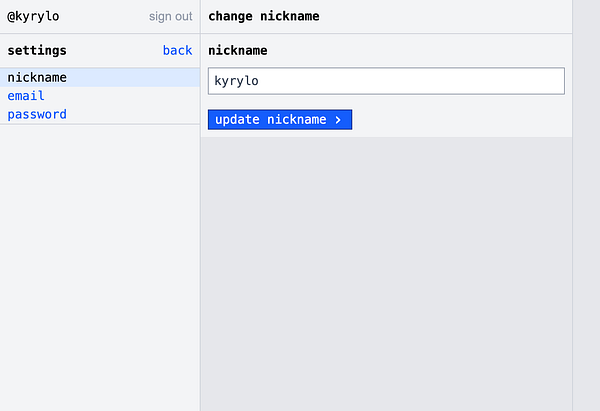
While building a mostly text-based UI for #telesink, something became obvious: icons make things look polished, but they rarely make things clearer.
kyrylo.org/2026/04/08/less-de…
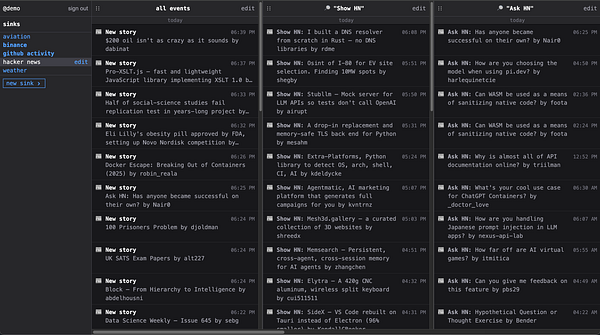
I just launched the first public #telesink demo!
Watch real-time events:
✈️ live aircraft
💵 Binance transactions
🐙 GitHub activity
👨💻 Hacker News posts & jobs
☀️ weather in major cities
See what’s happening, as it happens 👇
demo.telesink.com
---
Note: still a WIP, so not fully stable yet, bugs may happen.
The upside? It’s open-source!
github.com/telesink
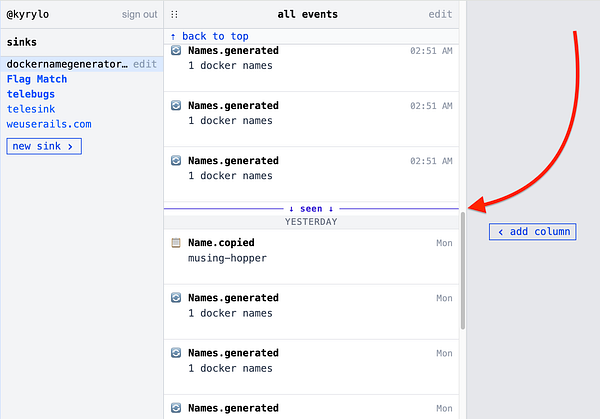
Inspired by messaging apps, I added a “seen” bar to #telesink.
Here’s how it works:
✅ When you’re not viewing a sink, it continues receiving events
✅ Telesink remembers the first unseen event
✅ When you open a sink, it shows exactly where you left off
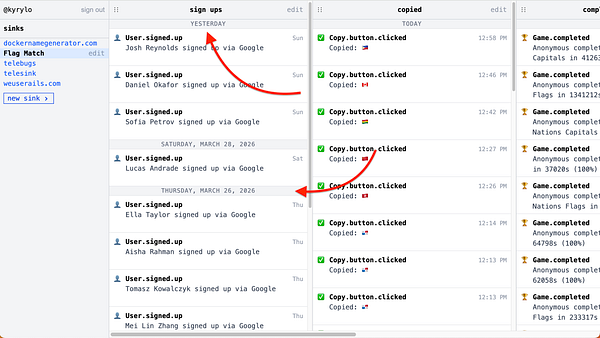
Columns in each #telesink feed now include day delimiters.
Previously, the continuous stream of events made it hard to track activity. These delimiters give each column clear structure.
Just added a smart visual cue to #telesink.
When you're not viewing a sink, it now gets bolded in the list to show new events have arrived.
Just added column reordering to #telesink
Now you can drag your columns around to put the most important events exactly where you want them.
Prioritize what matters most!
Scroll a #telesink column and jump back to the top instantly. Since it’s real-time, you’ll see how many new events arrived while you were browsing older ones.
⚡️ See your events instantly at #telesink
Demo in the video: sink setup + first event in <30 seconds. Production apps: SDK in minutes.
Just shipped column filtering in #telesink, and holy shit, the dashboard finally feels like a real product 🔥
I’m already dogfooding it on my own projects. Here’s the quick demo I recorded:
- Button clicks tracked with JS
- Completed games coming in from Ruby
Everything lands in one single sink. Now you just create columns and slap on whatever filters you want:
- event type
- search text
- or both at the same time
In my dashboard I set up 3 columns in 30 seconds:
1. Button clicks only
2. Completed games only
3. South American completed games only
That’s it. There's no noise. You monitor only signals that matter to your business.
What I love about it is that it’s stupidly simple to wire together... yet insanely powerful the moment you start using it.
Who else wants this? 👀